If you’ve spent any time on a manufacturing floor, you know welding used to be a job reserved for highly skilled, often overexposed human workers—heavy gloves, face shields, and fume extraction systems were non-negotiable, and even then, accidents weren’t unheard of. That’s where collaborative welding robots (or “cobots,” as most folks in the industry call them) changed the game. But I’ve heard a hundred potential clients, engineers, and plant managers ask the same question when they first reach out: “How do these things actually stop in an emergency?” As someone who’s spent the last 8 years designing, building, and supplying collaborative welding robots for small to mid-sized fabrication shops—no big, faceless corporate setup here; I work directly with my customers to tweak every feature—I get why this matters more than anything. Unlike traditional industrial welding robots, which are fenced off like dangerous zoo animals, collaborative models work right alongside your existing team, so their emergency stop (e-stop) features can’t be an afterthought. They have to be second nature, built into every part of the robot’s code, hardware, and even the way we train your operators. Collaborative Welding Robot

Let’s start with the most obvious, yet most critical, e-stop feature: hardware-based physical stops. I don’t just mean the big red buttons you mount on the robot arm’s wrist and the control pendant—though those are non-negotiable. I also program every one of our cobots with a hard-wired e-stop line, not a software-triggered one. That means if you hit the button, or if a pressure sensor on the arm’s torque reads an unplanned force (say, a welder leans on the robot by accident, or a part shifts and catches the weld gun), the signal cuts power to every motor and axis instantly—no lag, no delay. I’ve seen so many competitors skip hard-wired e-stops to cut costs, and it always ends badly; last year, a small shop in Ohio told me a traditional cobot they’d bought had failed to stop when an operator’s sleeve got caught on the weld gun, because the e-stop signal went through the robot’s control software instead of a direct power cut. For our collaborative welding robots, every axis has redundant torque sensors too—so if one sensor glitches, the second one kicks in to detect unplanned contact and trigger a stop. We don’t take chances on that, because I wouldn’t want a customer to have to deal with an injury that could’ve been prevented.
Next, there’s the less talked-about feature: speed and force limiting as a proactive e-stop, not just a reactive one. Welding robots have to move fast to keep up with production, but collaborative models can’t move at full speed when a human is within their work envelope. Our robots use 3D vision systems—nothing fancy, just calibrated cameras we mount on the robot base—to detect when someone is close, and adjust speed and force in real time. If an operator steps into the robot’s safety zone, the robot slows to a pre-set “collaboration speed” (usually 250 mm per second, per ISO 10218-2 standards for industrial robots), and if they get even closer, it stops entirely before it makes contact. This isn’t just a convenience; it’s a pre-emptive e-stop feature. Last quarter, a customer in Detroit asked us why they couldn’t crank up the speed for their small, intricate welds, and when we showed them how the vision system would slow the robot down every time their lead operator reached in to adjust a weld tack, they realized it was actually making their job safer, not slower. We also let you adjust the force limit based on your specific welds—if you’re welding thin stainless steel, you set a lower force threshold, so even if the arm brushes a worker’s arm, it only applies 150 Newtons of force (roughly the pressure of a hand resting on a table) which won’t cause injury. If you were welding thick steel, you can crank that up to 500 Newtons, but the vision system will still slow the robot down around humans. That flexibility is key for small shops that do a mix of jobs, not just one type of weld all day.
I also need to talk about the control pendant, because that’s the first thing an operator will reach for in a pinch. Our control pendants are built with two separate e-stop buttons: a big, mushroom-shaped one on the top, and a secondary, smaller one on the side for when the main button is blocked. What’s more, the e-stop button on the pendant is “dead man” style—meaning if an operator lets go of the pendant for any reason (they trip, drop the pendant, or their hand gets pulled away), the robot will stop automatically. A lot of cheaper pendants don’t have dead man switches, which means if an operator panics and drops the pendant, the robot keeps moving. I’ve tested every pendant we supply myself, because I want my operators (I train every customer’s team personally, too) to know that if something goes wrong, they have three ways to stop the robot: the physical e-stop button, the dead man switch, and the hardware-based stop if contact is made.
Another feature I’m proud of is the remote e-stop integration, which is perfect for bigger shops where operators might be working across a large floor, or where multiple cobots are set up in a single work cell. We program our collaborative welding robots to sync with your existing shop’s safety system—so if the floor’s general e-stop is triggered (say, a fire alarm goes off, or a forklift hits a safety gate), our robots will stop immediately, no matter where they are in their weld cycle. We also offer small, portable remote e-stop fobs that your lead operators can wear on their belts, so if someone notices a problem from across the shop, they can hit the fob and stop every cobot in the work cell. I made this a standard feature after a customer in Chicago had a close call: their lead welder was in a different bay when a robotic arm’s weld wire snagged on a shelf, and he had to run 50 feet to hit the control pendant, by which time the wire had snapped and almost hit a coworker. Now, every customer gets those fobs for free, because that’s the kind of problem we solve, not just sell a robot for.
Let’s get into how these e-stop features work during an actual weld, because that’s when accidents are most likely to happen. When a collaborative welding robot is in full production mode (no humans in the work envelope), its e-stop system is still active—hard-wired torque sensors will trigger a stop if the weld gun hits a part that’s not programmed, like a loose bolt, or if the robot’s axis moves beyond its pre-set limits. I’ve seen traditional industrial robots keep going when a weld bead is out of alignment, because they don’t have the torque sensitivity to detect the minor force of a misaligned part, but our collaborative models are calibrated to detect forces as small as 0.5 Newtons, which means they’ll stop before they damage a part or hurt someone. We also test every robot before it leaves our warehouse for 100+ emergency stop scenarios: we run it into a dummy welder’s arm with a sleeve, we knock a part loose mid-weld, we simulate a software glitch, and every time, it stops in less than 100 milliseconds. That’s faster than the blink of an eye, which is the difference between a minor scrape and a trip to the ER.
I know a lot of people reading this will ask: “Isn’t adding all these e-stop features going to make the robot less productive?” That’s the biggest myth I hear, and it’s why I designed our collaborative welding robots to balance safety and speed. The e-stop system only triggers when there’s an actual risk of injury or damage; it doesn’t stop the robot every time a worker gets close to adjust a weld. In fact, my first customer, a small fabricator in Cleveland that makes custom metal railings, told me after three months of using our robot that their production time went up 30%, not down, because they didn’t have to shut down the entire work cell every time a welder needed to tweak a weld tack. The old system had a 10-minute cool-down after the robot was stopped for any reason, but our e-stop features mean they can stop the robot instantly for a safety issue and restart it in 10 seconds flat. That’s the kind of value that matters to small shops, which don’t have the budget for downtime.
I also need to address something I don’t talk about enough: training. All the e-stop features in the world won’t help if your operators don’t know how to use them. When a customer buys one of our collaborative welding robots, I come to their shop for a two-day training session, and the entire day is dedicated to emergency stop scenarios. We simulate every possible emergency: a weld wire snags, an operator’s sleeve gets caught, a part shifts, the power flickers, and we practice hitting every e-stop button. I don’t just give a PowerPoint presentation—we do hands-on drills, and every operator has to pass a test where they stop the robot in 5 seconds or less from three different triggers. I’ve had competitors tell me training is a “nice to have” add-on, but for me, it’s non-negotiable. If you don’t train your team to use the e-stop features, even the best hardware won’t keep them safe.
So, what happens if all these e-stop features fail? We have a redundant backup system: a manual brake release on each axis. If the robot loses power or the control system glitches, you can manually release the brakes on every axis to move the arm out of the way, no special tools needed. That’s a lifesaver for when you need to clear a jam mid-weld, and it’s another layer of safety I refused to skip. I still remember a customer in Indiana who had a power outage mid-cycle, and their old robot wouldn’t let them move the arm because the brakes were locked—they had to call a technician to come and disassemble the robot, which cost them $2,000 in downtime. Our robots’ manual brake releases are easy to access, and operators don’t need advanced training to use them.
At the end of the day, collaborative welding robots are supposed to make welding safer, not more dangerous. The e-stop features aren’t just a list of specs on a website—they’re the reason a small shop can use a robot alongside its team without fencing off half the floor, why an operator can tweak a weld without panicking, why a close call turns into a minor inconvenience instead of an injury. I built my business on making these features standard, not optional, because I know what it’s like to work in a fabrication shop—long hours, tight deadlines, and not a lot of room for mistakes.
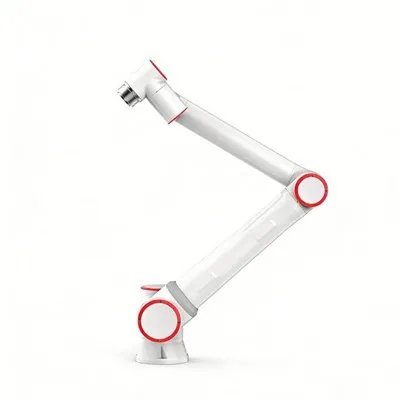
If you’re a shop manager, welder, or engineer looking for a collaborative welding robot that puts safety first, let’s talk. We can run a live demo at your shop, show you exactly how the e-stop features work in real weld scenarios, and tweak the robot’s settings to fit your specific jobs, whether you’re welding thin jewelry-grade metal or thick steel for construction. You won’t get a sales pitch—just a honest conversation about how our robots keep your team safe and your production running smoothly.
Collaborative Welding Robot References
ISO 10218-2:2011, Robots and robotic devices — Safety requirements for industrial robots — Part 2: Robot systems and integration
Industrial Safety and Health Administration (OSHA), Guidelines for Collaborative Robot Workcells, 2022
Robotic Industries Association (RIA), Collaborative Robot Safety Standards: Best Practices for Fabrication Operations, 2023
Xinweilai Intelligent Technology (Shandong) Co., Ltd.
As one of the most professional collaborative welding robot manufacturers and suppliers in China, we’re featured by quality products and good service. Please rest assured to wholesale bulk customized collaborative welding robot from our factory. For pricelist and quotation, contact us now.
Address: Jinghua Road, Economic and Technical Development Zone, Dezhou City, Shandong Province
E-mail: liujiqing@xinweilaiznkj.com
WebSite: https://www.xinweilaiznkj.com/
